Your Mac does the work. You just aren't there.
AI Box turns the Mac on your desk into an AI workstation — an assistant that browses, books and builds things for you, a writing studio, image generation, animated ads and explainers, and a real terminal — then hands you the controls on your phone. Tell it what to do, by voice or text, and it keeps working after you walk away. It asks before anything is paid, sent or deleted. The machine does the work. The keys never leave it.
Universal — Apple Silicon & Intel · Signed & notarized · macOS 10.15+
This is a public beta. It's stable enough that I use it for my own work every day, and free while it's in testing. What I want back is what broke, what confused you, and what you wish it did — open an issue or email me.
Powerful AI is either in someone else's cloud, or chained to your desk
Cloud tools see everything
Local tools stop at the desk
AI Box does both
Watch it browse, right beside the chat — and keep working
The assistant's browser now lives in a panel next to the conversation, the way it does in Claude's desktop app. You see every page it opens as it opens it, and you can reach in at any moment: click, scroll, type, paste. Meanwhile its Chrome stays out of your way — it never takes your screen, your mouse or your keyboard, so you get on with something else while it works.
A browser in the app
Sign in once, there
Full autonomy, if you want it
And a new Video tab
Animated ads and explainers, voiced, scored and animated on your Mac — with your own logo, for a few cents each. See how it works below.
Assistant Agent: say what you want done, and walk away
“Book a table for two at 8 on Friday.” “Add this domain to my Vercel project.” “Find the invoice from March and put it in the tax folder.” The assistant does the job itself, step by step, on your Mac — and the job runs there, so it keeps going when you close the window or lock your phone. Tell it more while it works; answer when it asks.
A real browser
Your Mac, when you ask
You stay in charge
Talk to it
Tap the microphone and speak: what you said is sent straight away and the answer is read back. “Yes” or “no” answers its approval cards, in English or German. Type instead, and it answers in text. On the phone this works over the secure Tailscale link below.
Screen Assist: hold a key, ask out loud, and it does it
Everything above lives in the app's window. This does not. Hold ⌥ Space anywhere on your Mac, say what you want, and let go. A bar appears over whatever you were using, answers you out loud, circles the thing it is talking about — and, if you asked for something to be done, does it.
It sees
It hears
It acts
Two kinds of hands, and the difference matters
System switches
Real clicks and keystrokes
You watch it happen, and you can stop it
- ▪Every step is named as it happens — “Clicking the Wi-Fi menu” — and ticked or flagged as it finishes
- ▪Escape stops it from anywhere on the Mac, even once the app it is driving has the keyboard
- ▪A ceiling on actions per request, or no ceiling at all if you are watching and want a long job finished
- ▪It will not buy, send, post or delete anything, or touch passwords, keychains or payment details
- ▪The bar floats without bringing AI Box forward — your work stays exactly where it was
- ▪Answers are spoken in the language you asked in, by a voice that actually speaks it
Only models that can actually do the job
This needs one model that can see a screen, hear a spoken question and call tools. Most cannot. The picker lists only those that can, and a model you choose is sent a real request — a screenshot, a spoken sentence and a tool — before it is kept. Anything that refuses, stalls or answers in the wrong shape is dropped and never offered again, so a failure lands here rather than mid-question.
There is a local option too: a vision model on your own Mac, through Ollama, with the screenshot never leaving the machine. Slower, and typed rather than spoken — no local model has ears yet — but nothing is uploaded at all.
macOS asks your permission for each part the first time it is needed — screen recording to see, the microphone to hear, accessibility to click. Nothing is granted quietly, and any of them can be withdrawn without breaking the rest.
Five tabs down the left. This is what each one does.
They share one window, one model picker and one workspace — so a passage you wrote can be illustrated, and a file the agent touched is the same file your terminal is sitting in.
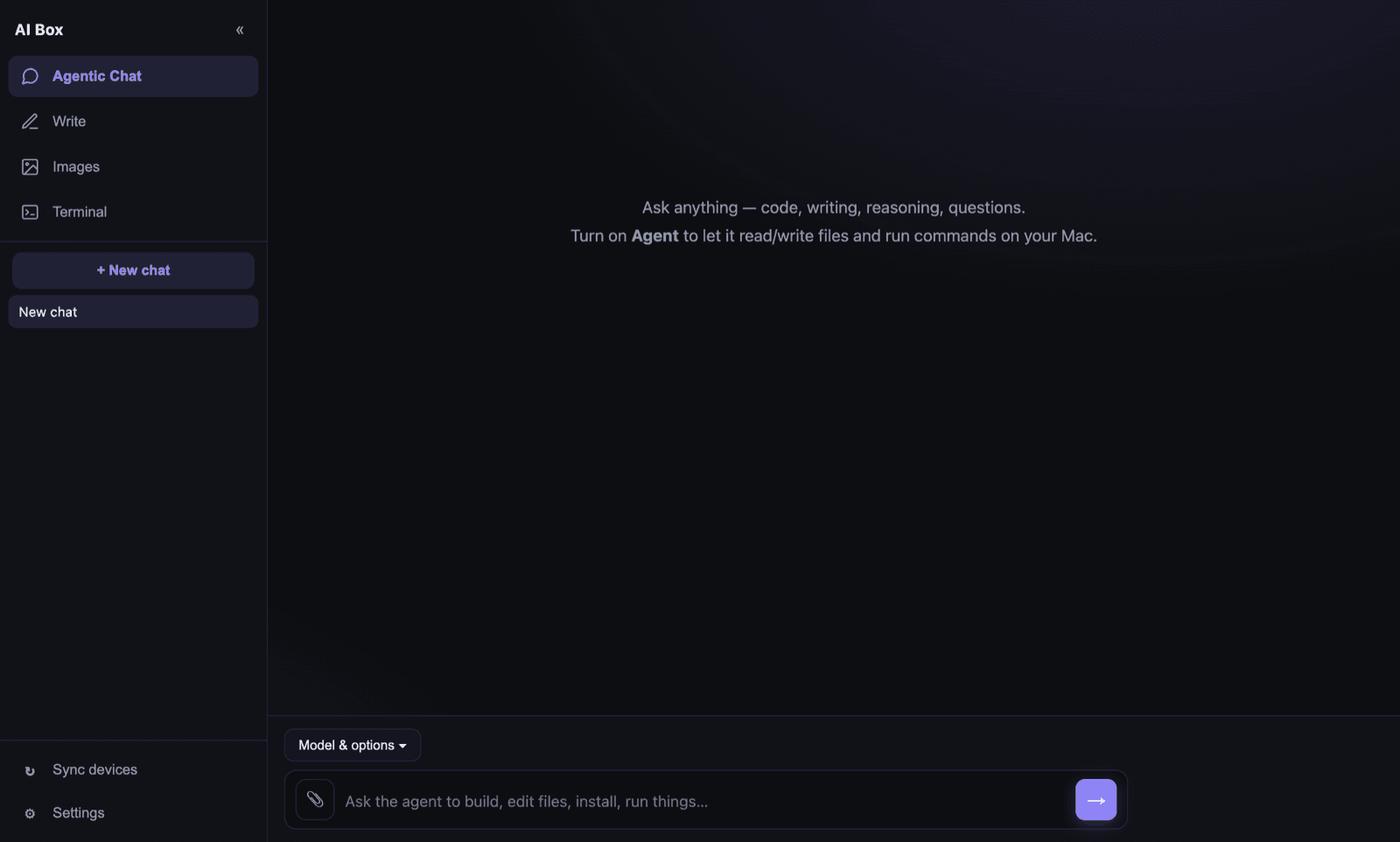
An assistant with hands, not a chat box
Ask a question and it answers. Ask it to do something — book, find, fix, build — and it does it on the machine rather than describing what you should do.
- Browses in a real Chrome, works in your open tabs, runs shell commands, reads and edits files
- Its browser live in a panel beside the chat — watch it, or click and type in it yourself
- Steps and approval cards right in the conversation
- Drop or paste images in; speak or type; carry on the conversation after it finishes
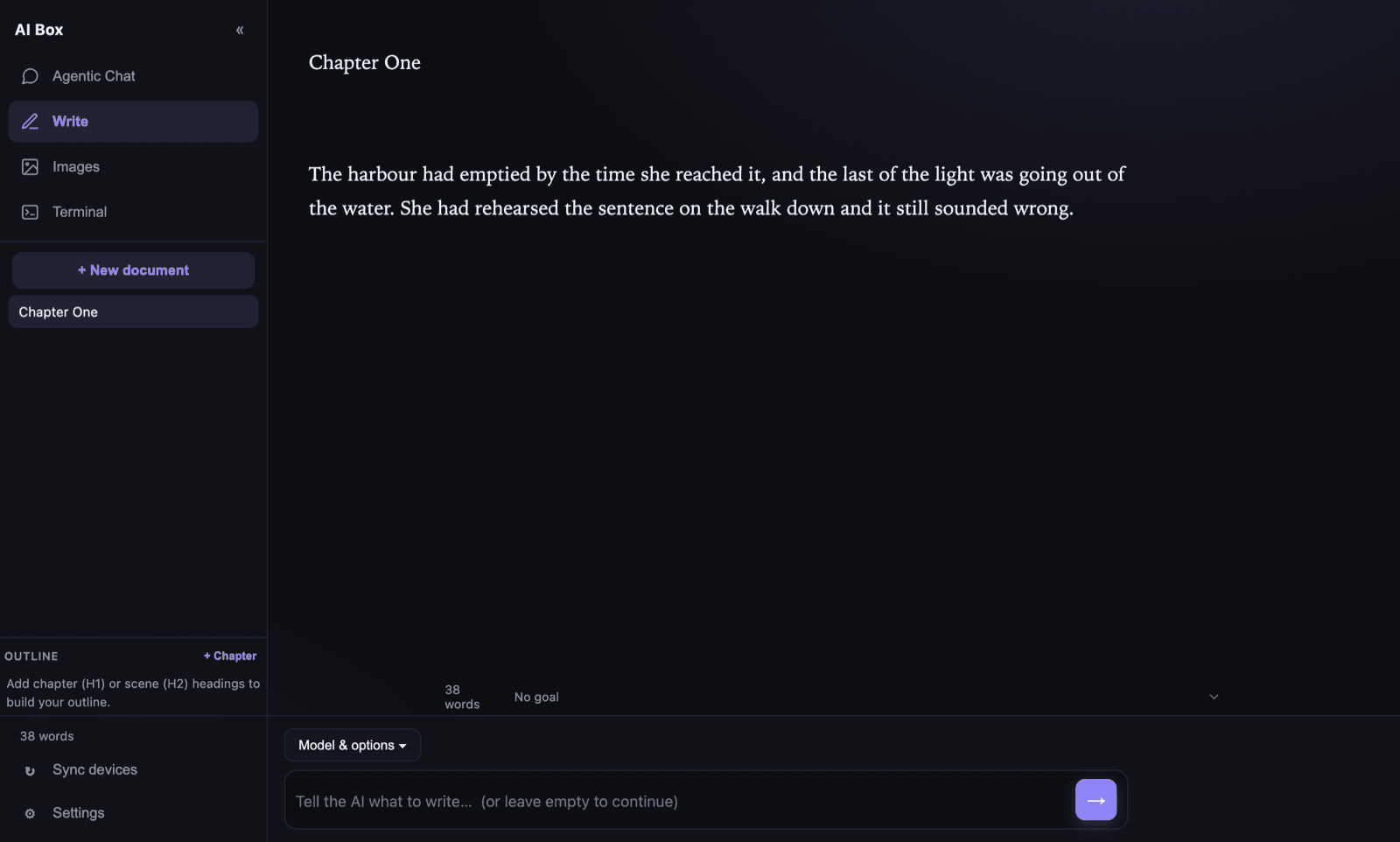
A manuscript editor that finishes your sentence
A proper writing surface rather than a chat transcript — your document stays the document, and the AI works inside it. No draft is ever really gone.
- Continue a passage mid-sentence, or proofread a selection and accept corrections one at a time
- Modes for fiction, business, marketing and academic work
- Chapter and scene outline, word goals, and version history on disk
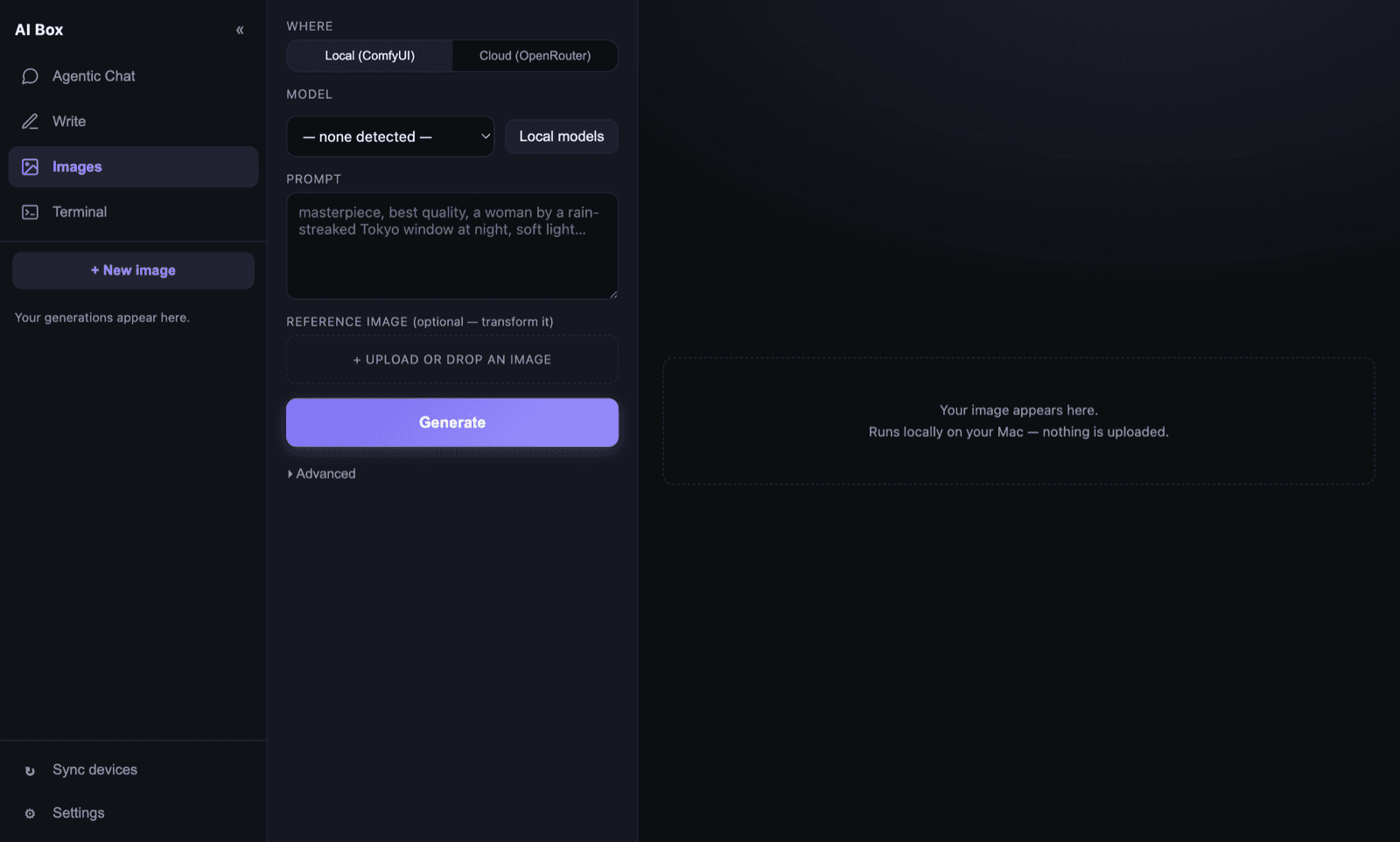
Your own GPU, or the best cloud models
Run it locally and nothing is uploaded to be rendered — the models run on the machine under your desk. Or reach for a cloud model when you want one, on your own key.
- A managed ComfyUI the app installs for you — no Python setup
- Or a cloud model on your chosen provider's key — Google's Nano Banana on Gemini, GPT Image on OpenAI, or anything on OpenRouter
- Exact output sizes — ask for 2400 × 2400 and get exactly that, resampled on the Mac
- Illustrate a scene straight from the passage you have selected in Write
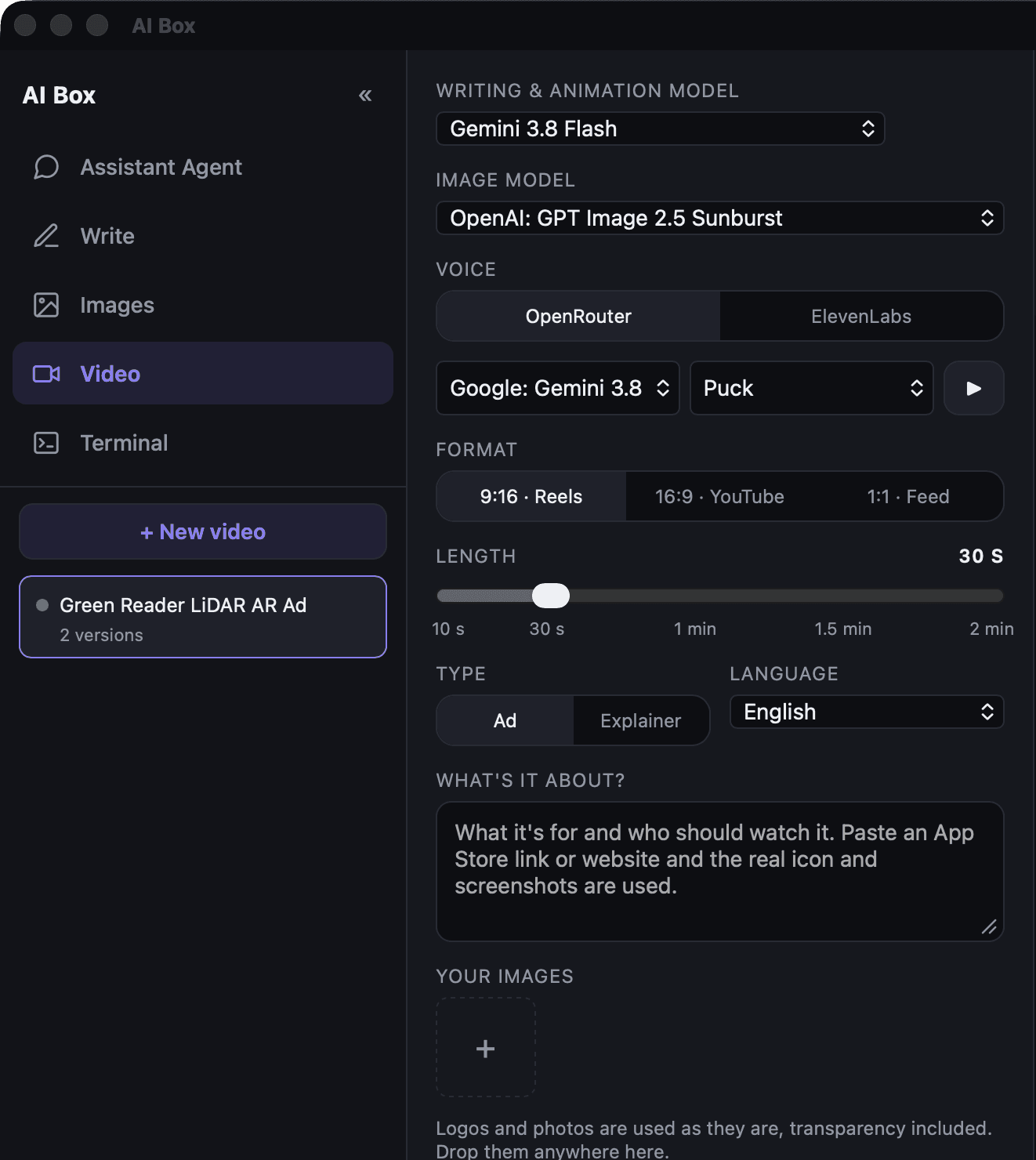
Animated ads and explainers, made on your Mac
Motion graphics, not stock footage: cut-out images, kinetic type and your brand, animated in code and filmed frame by frame into an MP4. Nothing paid runs until you press Make video — and then it's a few minutes and a few cents.
- A voice that drives the picture — any speech model on OpenRouter, or ElevenLabs on your own key — with every word timed and every animation placed on it
- Your logo and photos used as they are, transparency included; paste an App Store link and the real icon and screenshots are used
- Pick the models, the voice (hear a sample first), the format and a length from 10 seconds to 2 minutes; “Write script” drafts the voice-over for you to edit
- Music and effects synthesised on the Mac, mixed under the voice to −14 LUFS — no licences to worry about
- “Make the logo bigger” redoes only the animation, in under a minute for about a cent — and every version is kept

A real terminal, not a command box
The tab that makes the phone useful: a genuine shell on your Mac, in your pocket, with the same session waiting when you sit back down.
- An actual PTY — vim, top and claude all behave normally
- xterm.js on the front, Rust PTY sessions behind it
- Reachable from the sofa, or from a train
Your key, your account, your choice of provider
Most apps pick a provider for you and resell you the tokens. AI Box asks which one you want and then gets out of the way.
OpenRouter
Anthropic, OpenAI or Google — directly
One at a time, and you choose it
Or no provider at all
Three steps, and one of them is optional
- 01
Install it
Download the
.dmgand drag it across. It's signed and notarized by Apple, so it opens like any other app — no right-click-to-open dance. It updates itself from then on. - 02
Pick a provider, paste one key
Choose OpenRouter for one key that reaches every model, or go straight to Anthropic, OpenAI or Google and spend credit you already have there. Whichever you pick is what every model picker in the app offers — no mixed lists, no wondering which account paid. Or install a model through Ollama from inside the app and run with no key at all. Keys go into the macOS Keychain, never a config file.
- 03
Pair your phone — optional
Scan a QR code. Your phone opens the same app — over your home network, or anywhere through Tailscale — and installs to the home screen.
At home it just works. Away from home takes one more app.
AI Box never puts your Mac on the public internet, so how you reach it depends on where you are. Both routes carry the same pairing token, and neither opens a port to the world.
On your own network — nothing to install
Anywhere else — add Tailscale
Leave the Mac awake
One codebase, two transports
Every capability is written once against a transport layer that resolves at runtime to either Tauri IPC or an HTTP + WebSocket connection. That is why the phone isn't a cut-down companion app — it is the same app.
| Shell | Tauri 2 — a Rust backend with the system WebView. ~17 MB installed, not a bundled browser. |
|---|---|
| Interface | React 19 + TypeScript. TipTap/ProseMirror for the editor, xterm.js for the terminal. |
| Backend | Rust: provider streaming with server-side cancellation, a task runner that keeps the assistant going with no window open, Chrome over the DevTools protocol, PTY sessions, filesystem tools behind a path guard. |
| Remote | An axum HTTP + WebSocket server on the Mac serving the same bundle to the phone. Bearer auth, constant-time comparison, fails closed. |
| Sync | Item-level merge with tombstones. Edit the same document on both devices and neither side loses work. |
| Distribution | Universal binary, Developer ID signed, Apple-notarized, with minisign-verified auto-updates. |
An agent with real access needs real limits
- Your API key never leaves the Mac. The phone gets a placeholder so its interface knows a key exists; the Mac injects the real one when the request goes out.
- File access is jailed to a workspace folder you choose, with
..traversal and symlink escapes rejected in Rust, not in the interface. - Credentials are off-limits, always.
~/.ssh,~/.aws, keychains, shell startup files and LaunchAgents are refused outright — and turning off approval prompts does not turn this off. - Nothing final happens without you. Paying, booking, sending and deleting wait for your approval, on whichever device you are using. What counts as final is read from the page itself, not decided by the model — a web page can talk a model into things, but it cannot rename the button. Full autonomy lifts this, and only when you switch it on, on the Mac.
- Passwords stay yours. The assistant is never shown a password field, so it cannot type into one; logins, codes and CAPTCHAs are always handed back to you.
- Your words stay yours. Drafts are snapshotted to disk continuously, restorable, and exportable to a folder you own. With a local model, nothing leaves the machine at all.
Take it for a run, then tell me what broke
AI Box is free during beta and never hosts your content or pays for inference — you choose the model and the account it bills to.
Designed and built by GW‑InTech — available for work.